
OAuth 2.1 Authorization-Code Flow NEW
This is the recommended way for third-party / partner applications to obtain a session token on behalf of an end-user — without ever asking the user to share their API key, API secret, or trading-account password with your app.
The flow follows the standard OAuth 2.1 authorization-code grant (see oauth.net/2.1 for the spec). Your app hands the user off to a SAMCO-hosted consent page; the user authorises the request with the app's API Secret; SAMCO redirects the browser back to your callback URL with a short-lived authorization code; your backend then exchanges that code for an access_token (sent as the x-session-token header on Trade API calls) and a refresh_token.
Two ways to obtain a session token
- This page — OAuth 2.1 authorization-code flow. Recommended when your app authenticates end-users through a browser (web apps, mobile apps with a webview).
- Direct (
POST /session/token) — For your own apiKey + apiSecret, headless / server-to-server use.
Looking for the SAMCO Web Dashboard?
The SAMCO Web Dashboard (where account holders sign in to create OAuth apps and register static IPs) is documented in the Dashboard User Manual. That dashboard is separate from the partner OAuth consent UI described on this page.
Prerequisites
- Create an OAuth app in the Web Dashboard (under API Keys). When creating the app, register your Redirect URL — this is the callback your users will land on after a successful authorisation.
- Register static IPs for the app (under Static IPs) if you intend to call
POST /oauth/tokenfrom a backend server.
Redirect URL rules
- Must be HTTPS (
http://127.0.0.1is allowed for local testing). - The URL your app uses at authorize time must match the redirect URL registered for the app — including scheme, host, port, and path.
- If you need to change it, edit the app in the dashboard (OTP required).
The flow
 ┌──────────────┐                          ┌─────────────────────────┐
 │ Your App     │ 1. GET /oauth/authorize  │  Samco OAuth Consent UI │
 │              │ ───────────────────────► │  tradeapi.samco.in/app  │
 │              │                          │                         │
 │              │                          │  user enters API Secret │
 │              │                          │                         │
 │              │                          │  POST /oauth/authenticate
 │              │                          │  issues 10-min auth_code│
 │              │                          │  returns redirectTo JSON│
 │              │                          │                         │
 │              │ 2. browser navigates to  │                         │
 │              │    redirect_url?code=…   │                         │
 │              │    &state=…              │                         │
 │              │                          │                         │
 │              │ 3. authorization code    │                         │
 │              │    received — must be    │                         │
 │              │    exchanged within 10m  │                         │
 │              │                          │                         │
 │ Your backend │ 4. POST /oauth/token     │                         │
 │              │    grant_type=           │                         │
 │              │      authorization_code  │                         │
 │              │ ───────────────────────► │  exchange code for      │
 │              │                          │  access_token (24h) +   │
 │              │ 5. {access_token, …}     │  refresh_token (7d)     │
 │              │ ◄─────────────────────── │                         │
 │              │                          │                         │
 │              │ 6. API call with         │                         │
 │              │    x-session-token: …    │                         │
└──────────────┘ └─────────────────────────┘Step 1 — Redirect the user to the SAMCO authorize page
From your app, send the user's browser to:
https://tradeapi.samco.in/app/oauth/authorize
    ?api_key=<AES_ENCRYPTED_API_KEY>
    &redirect_url=https://your-app.example.com/callback
    &state=<OPTIONAL_CSRF_TOKEN>
&scopes=<COMMA_SEPARATED_SCOPES> (optional; defaults to "all")| Query param | Required | Description |
|---|---|---|
api_key | yes | AES-encrypted form of your OAuth app's API key (the value mailed to you when the app was created — paste as-is, do not decrypt). |
redirect_url | yes | Your callback URL. Must exactly match the redirect URL registered for the app. |
state | no | An opaque, unguessable value generated by your app. SAMCO echoes it back unchanged in the callback so you can defend against CSRF. |
scopes | no | Comma-separated list of scopes you want to request. Must be a subset of the scopes registered on the app. Defaults to all. The consent page forwards this to the validation endpoint but does not render it to the end-user in the current build. |
Behind the scenes, the page calls GET /oauth/authorize to validate the api_key + redirect_url (+ scopes) against the registered OAuth app. On success the endpoint returns:
{
  "status": "Success",
  "message": "Authorization request validated. Continue with POST /oauth/authenticate to complete login and consent.",
  "data": {
    "appName":     "<your app's display name>",
    "apiKey":      "<echoed api_key>",
    "redirectUrl": "<echoed redirect_url>",
    "state":       "<echoed state>",
    "scopes":      "<resolved scopes>",
    "clientUid":   "<owner client UID>",
    "nextAction":  "/oauth/authenticate"
  }
}The consent UI uses appName to populate the heading. While validation is in flight the user sees a brief loading screen.
If the api_key or redirect_url does not match a registered app (or the app is inactive, or the scopes don't match), the consent UI behaviour splits:
- If the supplied
redirect_urlis a valid HTTP(S) URL, the browser is redirected back to it with?error=invalid_request&errorMessage=...&state=...(see step 3). - Otherwise the consent UI displays the error inline and does not redirect.
Step 2 — User authorises on the SAMCO consent page
On successful validation, the user sees the authorisation card with your app name clearly displayed and a single input that asks for the API Secret of that app.
You paste the AES-encrypted API Secret — not the plaintext
The value the consent page accepts is the AES-encrypted API Secret (~96 hex characters) that the dashboard delivered to you on app creation / secret regeneration. Plaintext secrets are rejected by POST /oauth/authenticate. If you no longer have the encrypted value, regenerate it from the API Keys page in the dashboard.
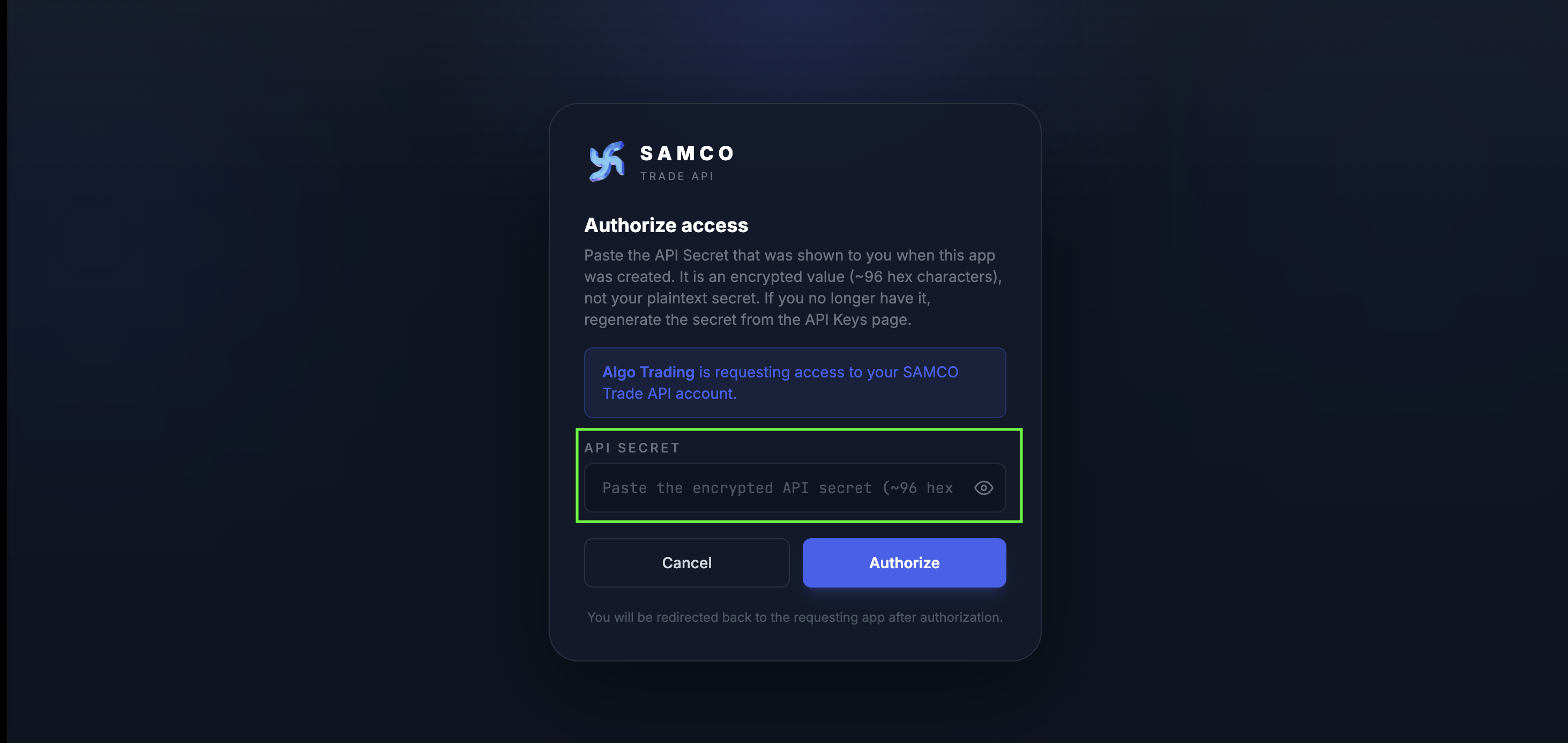
The consent page after GET /oauth/authorize validates your api_key and redirect_url.
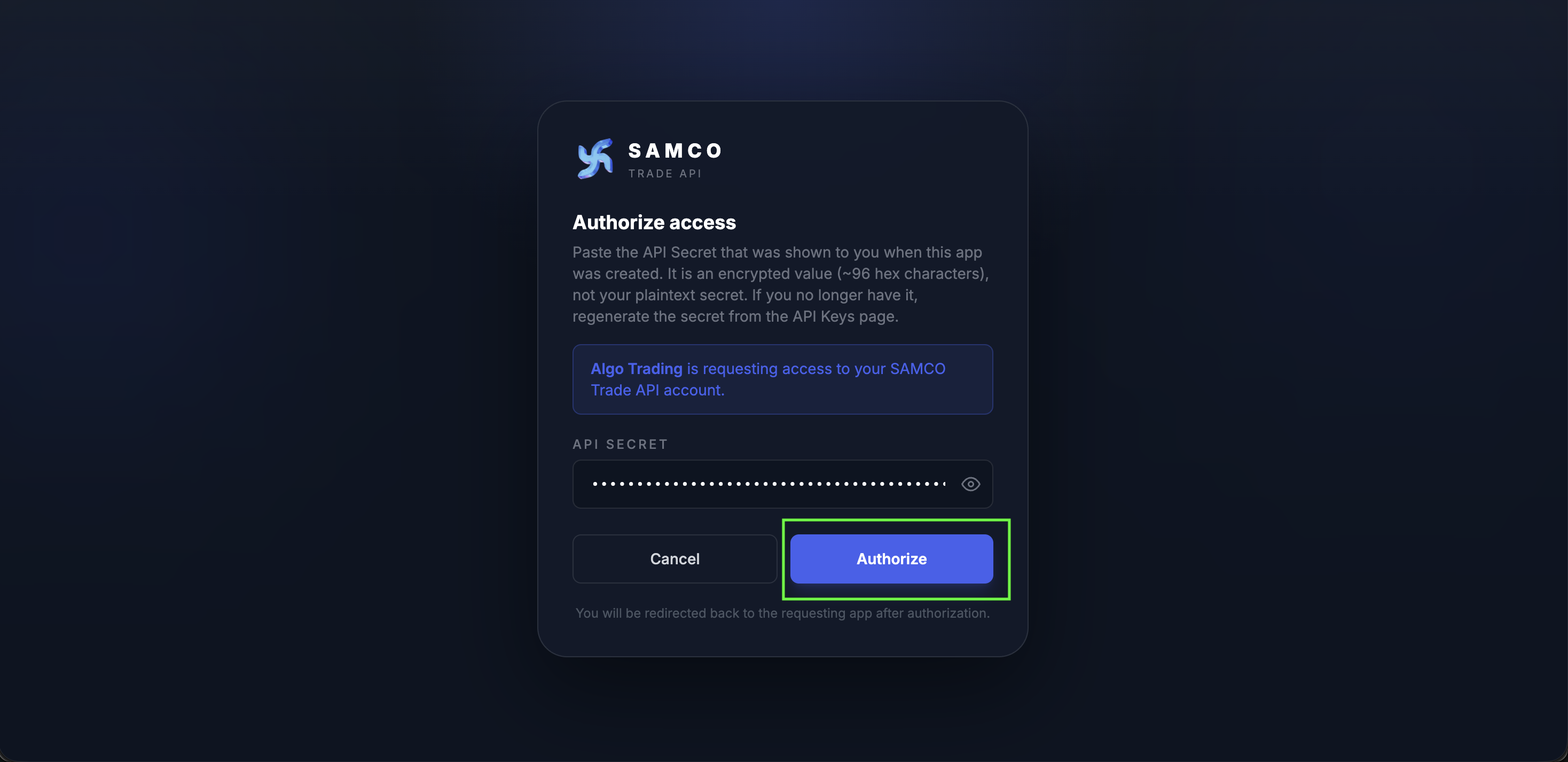
Submitting calls POST /oauth/authenticate. The button disables and shows "Authorizing…" until the server responds.
Submitting the form calls POST /oauth/authenticate server-side, which runs the following checks in this order:
- Decrypt and look up
api_key; reject inactive / unknown apps (EOAUTH001). - Validate
redirect_urlmatches the URL registered for the app (EOAUTH002). - Decrypt
api_secretand verify its hash against the secret stored when the app was created (EOAUTH008). - Enforce the static IP allowlist if
CLIENT_IP_MAPPINGrows are registered for this app (EOAUTH009). - Validate the requested
scopesare a subset of those registered on the app (EOAUTH003). - Generate a 10-minute, single-use
auth_code—randomBytes(32).toString('base64url')(~43 characters) — and persist it. - Return
{ status: "Success", data: { redirectTo: "<redirect_url>?code=<auth_code>&state=<state>" } }.
The consent UI then navigates the browser to redirectTo on the client side. (Earlier builds of /oauth/authenticate returned an HTTP 302 directly; the current contract returns JSON with data.redirectTo so failures surface inline in the consent UI rather than landing on your callback.)
Treat the encrypted API Secret as a bearer credential
Even though the value the user pastes is already encrypted (not plaintext), anyone who holds it can complete the OAuth flow for your app. Open the consent page only on a trusted machine, over HTTPS, and never paste the value into a shared session. The secret is never persisted client-side — it travels through the browser only on this single submission.
If the user cancels, or any of the checks above fails after the redirect_url itself has been validated, the browser is redirected to the callback URL with an error=...&errorMessage=... instead of a code (see step 3 error variant below).
Step 3 — Browser is redirected back to your callback URL
After a successful authorisation, the browser is redirected to:
https://your-app.example.com/callback
    ?code=<AUTHORIZATION_CODE>
    &state=<ECHOED_STATE>
What your callback URL looks like in the user's browser after a successful authorization.
| Query param | Description |
|---|---|
code | A single-use authorization code — base64url-encoded, ~43 characters, valid for 10 minutes. Exchange it at POST /oauth/token immediately (step 4). |
state | The same state value your app sent in step 1. You must verify it matches what you generated, then discard it (prevents CSRF replay). |
If the user cancelled, the redirect carries an error instead of a code:
https://your-app.example.com/callback
    ?error=access_denied
    &errorMessage=User+cancelled+the+login
&state=<ECHOED_STATE>If validation in step 1 failed (bad api_key, mismatched redirect_url, inactive app, invalid scopes) and the supplied redirect_url was itself a valid HTTP(S) URL, the consent UI redirects back with:
https://your-app.example.com/callback
    ?error=invalid_request
    &errorMessage=<server-provided+detail>
&state=<ECHOED_STATE>If the redirect_url was malformed, the consent UI shows the error inline and does not redirect.
Authorization code received
Your backend must exchange this code at POST /oauth/token (with grant_type=authorization_code) within 10 minutes to obtain an access_token. Use that access_token as the x-session-token header on subsequent Trade API calls.
Step 4 — Exchange the code for an access_token
From your backend (not the browser), POST the code to /oauth/token:
POST /oauth/token HTTP/1.1
Host: tradeapi.samco.in
Content-Type: application/json

{
  "grant_type" : "authorization_code",
  "code"       : "<AUTH_CODE_FROM_STEP_3>"
}curl -X POST 'https://tradeapi.samco.in/oauth/token' \
-H 'Content-Type: application/json' \
-H 'Accept: application/json' \
-d '{
"grant_type": "authorization_code",
"code": "<AUTH_CODE_FROM_STEP_3>"
}'import java.net.URI;
import java.net.http.HttpClient;
import java.net.http.HttpRequest;
import java.net.http.HttpResponse;
public class Sample {
public static void main(String[] args) throws Exception {
HttpClient client = HttpClient.newHttpClient();
String requestBody = "{\n" +
" \"grant_type\": \"authorization_code\",\n" +
" \"code\": \"<AUTH_CODE_FROM_STEP_3>\"\n" +
"}";
HttpRequest request = HttpRequest.newBuilder()
.uri(URI.create("https://tradeapi.samco.in/oauth/token"))
.header("Content-Type", "application/json")
.header("Accept", "application/json")
.POST(HttpRequest.BodyPublishers.ofString(requestBody))
.build();
HttpResponse<String> response =
client.send(request, HttpResponse.BodyHandlers.ofString());
System.out.println(response.body());
}
}(async () => {
const response = await fetch('https://tradeapi.samco.in/oauth/token', {
method: 'POST',
headers: {
'Content-Type': 'application/json',
'Accept': 'application/json',
},
body: JSON.stringify({
grant_type: 'authorization_code',
code: '<AUTH_CODE_FROM_STEP_3>',
}),
});
const data = await response.json();
console.log(data);
})();import requests
payload = {
'grant_type': 'authorization_code',
'code': '<AUTH_CODE_FROM_STEP_3>',
}
r = requests.post('https://tradeapi.samco.in/oauth/token',
headers={'Content-Type': 'application/json', 'Accept': 'application/json'},
json=payload)
print(r.json())Why no api_key / api_secret here
The code itself is the credential. It is unguessable, single-use, valid only for 10 minutes, and bound server-side to the app that authorised it. Re-sending the app credentials at token-exchange time adds no security and is not required.
Response (200):
{
  "status": "Success",
  "data": {
    "access_token"             : "eyJhbGciOi...",
    "token_type"               : "Bearer",
    "expires_in"               : 86400,
    "refresh_token"            : "k6Yc7…base64url…",
    "refresh_token_expires_in" : 604800,
    "session_id"               : "9c3f…hex…",
    "user_id"                  : "ABCD1234",
    "scopes"                   : "all",
    "accountID"                : "ABCD1234",
    "accountName"              : "Jane Doe",
    "exchangeList"             : ["NSE", "BSE", "NFO", "CDS", "MCX"],
    "orderTypeList"            : ["LIMIT", "MARKET", "SL", "SL-M"],
    "productList"              : ["CNC", "MIS", "NRML"],
    "srcIp"                    : "203.0.113.42",
    "primaryIp"                : "203.0.113.42",
    "secondaryIp"              : "203.0.113.43"
  }
}| Field | Description |
|---|---|
access_token | JWT. Send it as the x-session-token header on all subsequent Trade API calls. Valid for 24 hours (expires_in: 86400). |
refresh_token | Opaque base64url string. Use it to obtain a fresh access_token without re-prompting the user. Valid for 7 days (refresh_token_expires_in: 604800). |
session_id | Server-side identifier for the session (used for revocation / audit). |
user_id | Trading-account clientUid — same value as accountID. |
accountID / accountName | Trading account metadata for the authenticated user. |
exchangeList / orderTypeList / productList | What the account is enabled for. |
srcIp | The client IP this token was issued to. Subsequent Trade API calls should originate from this IP. |
primaryIp / secondaryIp | Static IPs registered for the OAuth app — useful for verifying your allowlist setup matches what's on file. |
The auth code is single-use — replaying it sequentially returns EOAUTH012 and revokes all tokens issued under the same api_key for the user as a security measure. See Concurrent exchanges below for the race-vs-replay distinction.
Step 5 — Use the access token
GET /position/getPositions HTTP/1.1
Host: tradeapi.samco.in
Accept: application/json
x-session-token: <ACCESS_TOKEN_FROM_STEP_4>Step 6 — Refresh the access token (optional)
When access_token is close to expiry (or has expired within the 7-day refresh window), call /oauth/token again with the refresh-token grant:
POST /oauth/token HTTP/1.1
Host: tradeapi.samco.in
Content-Type: application/json

{
  "grant_type"   : "refresh_token",
  "refresh_token": "<REFRESH_TOKEN_FROM_STEP_4>"
}curl -X POST 'https://tradeapi.samco.in/oauth/token' \
-H 'Content-Type: application/json' \
-H 'Accept: application/json' \
-d '{
"grant_type": "refresh_token",
"refresh_token": "<REFRESH_TOKEN_FROM_STEP_4>"
}'import java.net.URI;
import java.net.http.HttpClient;
import java.net.http.HttpRequest;
import java.net.http.HttpResponse;
public class Sample {
public static void main(String[] args) throws Exception {
HttpClient client = HttpClient.newHttpClient();
String requestBody = "{\n" +
" \"grant_type\": \"refresh_token\",\n" +
" \"refresh_token\": \"<REFRESH_TOKEN_FROM_STEP_4>\"\n" +
"}";
HttpRequest request = HttpRequest.newBuilder()
.uri(URI.create("https://tradeapi.samco.in/oauth/token"))
.header("Content-Type", "application/json")
.header("Accept", "application/json")
.POST(HttpRequest.BodyPublishers.ofString(requestBody))
.build();
HttpResponse<String> response =
client.send(request, HttpResponse.BodyHandlers.ofString());
System.out.println(response.body());
}
}(async () => {
const response = await fetch('https://tradeapi.samco.in/oauth/token', {
method: 'POST',
headers: {
'Content-Type': 'application/json',
'Accept': 'application/json',
},
body: JSON.stringify({
grant_type: 'refresh_token',
refresh_token: '<REFRESH_TOKEN_FROM_STEP_4>',
}),
});
const data = await response.json();
console.log(data);
})();import requests
payload = {
'grant_type': 'refresh_token',
'refresh_token': '<REFRESH_TOKEN_FROM_STEP_4>',
}
r = requests.post('https://tradeapi.samco.in/oauth/token',
headers={'Content-Type': 'application/json', 'Accept': 'application/json'},
json=payload)
print(r.json())The response shape is identical to step 4 — a new access_token and a new refresh_token (rotation). The old refresh_token is immediately marked inactive as part of issuing the new one, so always persist the new pair and discard the previous values atomically.
Step 7 — Revoke a token (logout)
POST /oauth/revoke HTTP/1.1
Host: tradeapi.samco.in
Content-Type: application/json

{
  "token"     : "<ACCESS_TOKEN_OR_REFRESH_TOKEN>",
  "token_type": "access_token"
}curl -X POST 'https://tradeapi.samco.in/oauth/revoke' \
-H 'Content-Type: application/json' \
-H 'Accept: application/json' \
-d '{
"token": "<ACCESS_TOKEN_OR_REFRESH_TOKEN>",
"token_type": "access_token"
}'import java.net.URI;
import java.net.http.HttpClient;
import java.net.http.HttpRequest;
import java.net.http.HttpResponse;
public class Sample {
public static void main(String[] args) throws Exception {
HttpClient client = HttpClient.newHttpClient();
String requestBody = "{\n" +
" \"token\": \"<ACCESS_TOKEN_OR_REFRESH_TOKEN>\",\n" +
" \"token_type\": \"access_token\"\n" +
"}";
HttpRequest request = HttpRequest.newBuilder()
.uri(URI.create("https://tradeapi.samco.in/oauth/revoke"))
.header("Content-Type", "application/json")
.header("Accept", "application/json")
.POST(HttpRequest.BodyPublishers.ofString(requestBody))
.build();
HttpResponse<String> response =
client.send(request, HttpResponse.BodyHandlers.ofString());
System.out.println(response.body());
}
}(async () => {
const response = await fetch('https://tradeapi.samco.in/oauth/revoke', {
method: 'POST',
headers: {
'Content-Type': 'application/json',
'Accept': 'application/json',
},
body: JSON.stringify({
token: '<ACCESS_TOKEN_OR_REFRESH_TOKEN>',
token_type: 'access_token',
}),
});
const data = await response.json();
console.log(data);
})();import requests
payload = {
'token': '<ACCESS_TOKEN_OR_REFRESH_TOKEN>',
'token_type': 'access_token',
}
r = requests.post('https://tradeapi.samco.in/oauth/revoke',
headers={'Content-Type': 'application/json', 'Accept': 'application/json'},
json=payload)
print(r.json())Revoking either token invalidates the entire session. The endpoint is idempotent — calling it with an unknown / already-revoked token still returns { "status": "Success", "message": "Token revoked successfully" }.
Sample callback handler
The SAMCO Web Dashboard ships a built-in /callback landing page you can point your test OAuth app at while integrating — register https://<dashboard-host>/callback as your app's redirect_url and the dashboard will render the following after a successful authorisation:
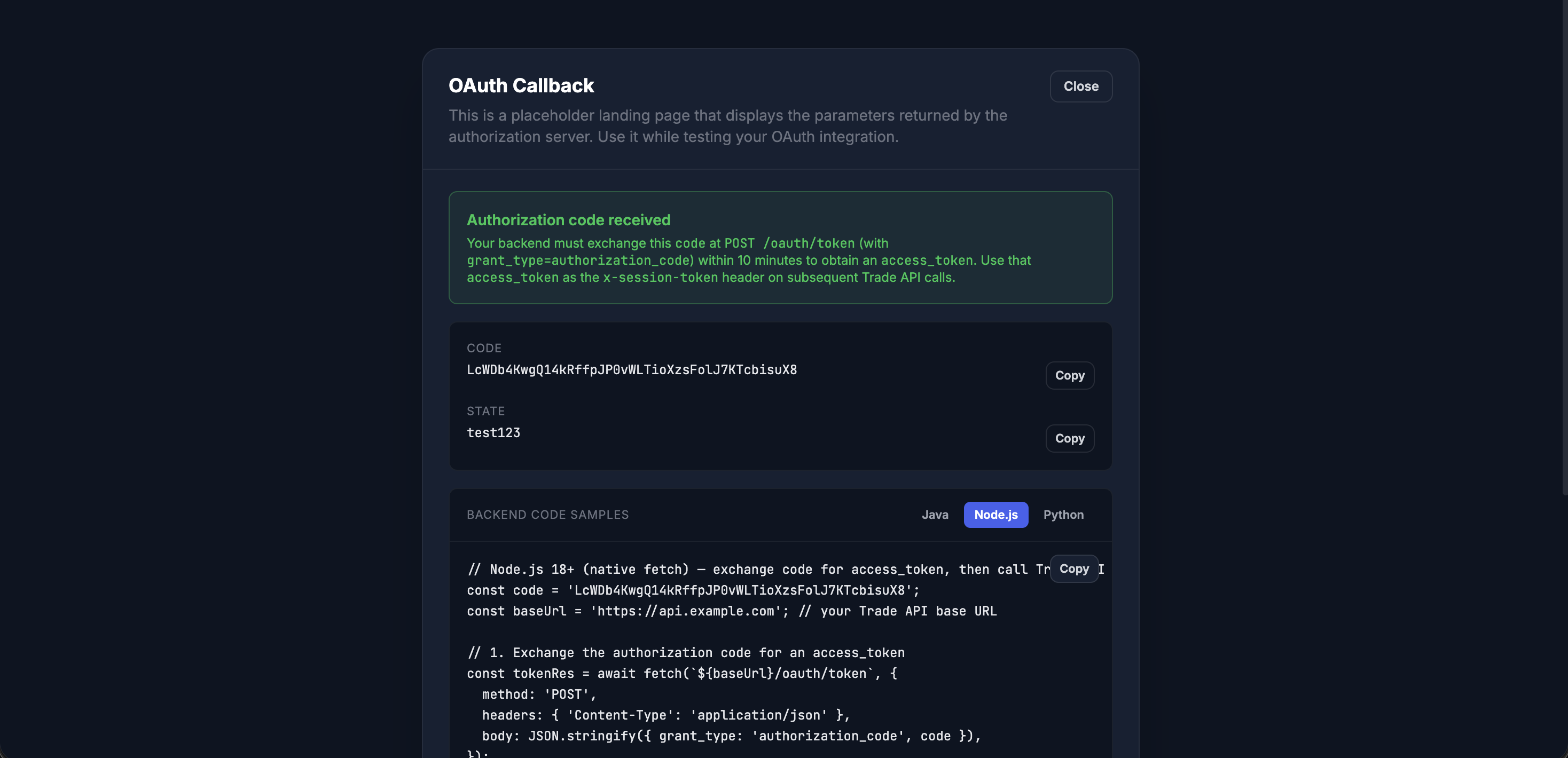
The page contains, top-to-bottom:
- A header OAuth Callback with a placeholder description and a Close button (returns to login).
- A green status panel Authorization code received — verbatim copy: "Your backend must exchange this
codeatPOST /oauth/token(withgrant_type=authorization_code) within 10 minutes to obtain anaccess_token. Use thataccess_tokenas thex-session-tokenheader on subsequent Trade API calls." - The received
codeandstatevalues, each with a Copy button. - A Backend code samples panel with three tabs — Java, Node.js, Python — each pre-populated with the received
codeinterpolated into a runnable two-step snippet: (1)POST /oauth/tokento exchange the code, (2) callGET /holding/getHoldingwith the resultingaccess_tokenin thex-session-tokenheader. - A collapsible All query parameters block listing every query-string key/value that landed on the URL — useful for debugging the error variants.
- A footer reminder: "For production, replace this URL with your own backend endpoint that securely exchanges the code for an access token."
If the redirect carried an error=... instead of a code=..., the green panel is replaced with a red Authorization failed panel that prints the error code and errorMessage, and no code snippets are rendered.
// GET https://your-app.example.com/callback?code=...&state=...
app.get('/callback', async (req, res) => {
  const { code, state, error, errorMessage } = req.query;

  // 1. CSRF check
  if (state !== req.session.oauthState) {
    return res.status(400).send('Invalid state');
  }
  delete req.session.oauthState;

  // 2. Handle error
  if (error) {
    return res.status(401).send(`Login failed: ${errorMessage}`);
  }

  // 3. Exchange code for access_token (server-to-server)
  const tokenRes = await fetch('https://tradeapi.samco.in/oauth/token', {
    method:  'POST',
    headers: { 'Content-Type': 'application/json' },
    body:    JSON.stringify({
      grant_type: 'authorization_code',
      code,
    }),
  });
  const { status, data } = await tokenRes.json();
  if (status !== 'Success') return res.status(401).send('Token exchange failed');

  // 4. Persist for the user. Use access_token as x-session-token on Trade APIs.
  req.session.samco = {
    accessToken:  data.access_token,
    refreshToken: data.refresh_token,
    sessionId:    data.session_id,
  };
  res.redirect('/dashboard');
});import os, requests
from flask import request, session, redirect, abort
@app.route('/callback')
def callback():
if request.args.get('state') != session.pop('oauth_state', None):
abort(400, 'Invalid state')
if request.args.get('error'):
return f"Login failed: {request.args.get('errorMessage')}", 401
r = requests.post('https://tradeapi.samco.in/oauth/token', json={
'grant_type': 'authorization_code',
'code': request.args['code'],
}).json()
if r.get('status') != 'Success':
return 'Token exchange failed', 401
d = r['data']
session['samco_access_token'] = d['access_token']
session['samco_refresh_token'] = d['refresh_token']
session['samco_session_id'] = d['session_id']
return redirect('/dashboard')Troubleshooting
"Unauthorized - Invalid token. sessId missing." on Trade API calls
You are sending something other than the access_token from step 4 as the x-session-token header. The code from the callback URL is not a session token — it must first be exchanged at POST /oauth/token (step 4). Use the access_token field of that response as x-session-token.
"Authorization code already used. All tokens revoked for security."
The code returned in step 3 is single-use. If you call POST /oauth/token twice with the same code (or your callback fires twice), SAMCO treats it as a replay and revokes every token previously issued under the same api_key for the user. Re-run the full flow from step 1.
"Authorization code has expired" (EOAUTH013)
code is valid for 10 minutes. Make sure your callback exchanges it promptly; don't queue it for batch processing.
"Concurrent token exchange in progress. Please retry." (EOAUTH030)
You issued two parallel POST /oauth/token requests with the same code (often a runaway retry library, or the user double-clicking through your callback). The backend uses a compare-and-swap on the code's used flag — the winner gets tokens, the loser gets EOAUTH030. Wait briefly, then re-issue once; if the original request actually succeeded, the retry will now surface EOAUTH012 ("already used") because the code has been claimed.
Retrying /oauth/token safely
- Sequential retries inside the 10-minute window are safe as long as the previous attempt did not succeed. A genuine transient infrastructure error (network blip, upstream 5xx before the code was claimed) leaves the code intact.
- Concurrent retries can race and produce
EOAUTH030— serialize them. - Any
EOAUTH012response means the code was already redeemed and all tokens issued under yourapi_keyfor that user have been revoked. Re-run the full authorization flow from step 1.
"Unable to start your trading session" after entering the API Secret
OAuth credentials were accepted but our trading backend could not establish a session for the underlying SAMCO trading account that owns the OAuth app. The integrator (or the account holder) should:
- Open the SAMCO mobile app (or Samco Web) and sign in once with the SAMCO Client ID + password (and OTP).
- If the password is rejected, complete a password reset from the mobile app's Forgot Password flow.
- If the account shows as blocked / dormant / under review, contact support@samco.in to unblock / reactivate.
- Retry the OAuth login.
This is also surfaced by the direct POST /session/token endpoint with the same message body.
Error code reference
The error codes you'll realistically encounter at runtime, mapped to the step that emits them:
| Code | Emitted by | Meaning |
|---|---|---|
EOAUTH001 | /oauth/authorize, /authenticate | Invalid or inactive api_key (decrypt failure or app not Active). |
EOAUTH002 | /oauth/authorize, /authenticate | redirect_url does not match the URL registered for the app. |
EOAUTH003 | /oauth/authorize, /authenticate | Requested scopes are not a subset of those registered on the app. |
EOAUTH008 | /oauth/authenticate | Invalid api_secret (decrypt failure or hash mismatch). |
EOAUTH009 | /oauth/authenticate, /token | Request originated from an IP not on the app's static-IP allowlist. |
EOAUTH010 | /oauth/token | code field missing on authorization_code grant. |
EOAUTH011 | /oauth/token | code not found in the auth-codes store. |
EOAUTH012 | /oauth/token | code was already used — all tokens for this api_key revoked. |
EOAUTH013 | /oauth/token | code expired (older than 10 minutes). |
EOAUTH015 | /oauth/token | refresh_token field missing on refresh_token grant. |
EOAUTH016 | /oauth/token | refresh_token not found or has been invalidated. |
EOAUTH017 | /oauth/token | refresh_token expired (older than 7 days). |
EOAUTH030 | /oauth/token | Concurrent exchange of the same code — see above. |
EOAUTH999 | /oauth/token | Trading backend could not establish a session for the underlying account (see "Unable to start your trading session" above). |
Why this flow?
- No credential sharing — end-users never hand their SAMCO password or your app's API secret to a third-party UI.
- Standard OAuth 2.1 — well-understood authorization-code grant with replay protection on the code.
- SEBI compliant — authorisation happens on SAMCO's domain with full audit trail.
- Static-IP-friendly — the token-exchange endpoint enforces the IPs registered for your OAuth app; calls from other IPs are rejected.
- Long-lived sessions — 24-hour
access_token+ 7-day rotatingrefresh_tokenkeeps integrations stable without forcing daily re-consent.
Need a backend-only flow?
If your integration is purely server-to-server (no end-user browser involved), use POST /session/token directly with your own apiKey + apiSecret.